Reaction Time Test
Take this free reaction time test to see how fast your reflexes really are. Click the moment the box turns green, and then compare your average with other people.
How fast are your reflexes?Click or tap as soon as the box turns green. Space and Enter work too.
How you compare
Finish a round to see where your average falls compared with typical reaction times.
Your tries
| # | Reaction | Result |
|---|---|---|
| Your reaction times will appear here. | ||
Reaction time levels
Everything runs in your browser. Your best average is saved only on this device. Results depend on your mouse, screen and browser, so a wired mouse and a high refresh rate monitor give the most accurate times.
How the Reaction Time Test Works
- Start the test. First, click or tap the blue box, or press Space.
- Wait for green. Next, the box turns red. Then, after a random delay of 1 to 4 seconds, it turns green.
- Click as fast as you can. As soon as you see green, click, tap or press Space. The reaction time test then shows your time in milliseconds (ms).
- Repeat. Finally, after 5 or 10 tries, you get your average, your fastest time and your level.
If you click while the box is still red, the test says “Too soon!” and that try does not count. Because the delay is random, you cannot guess the timing, so the reaction time test measures your real reflexes.
Reading Your Reaction Time Test Results
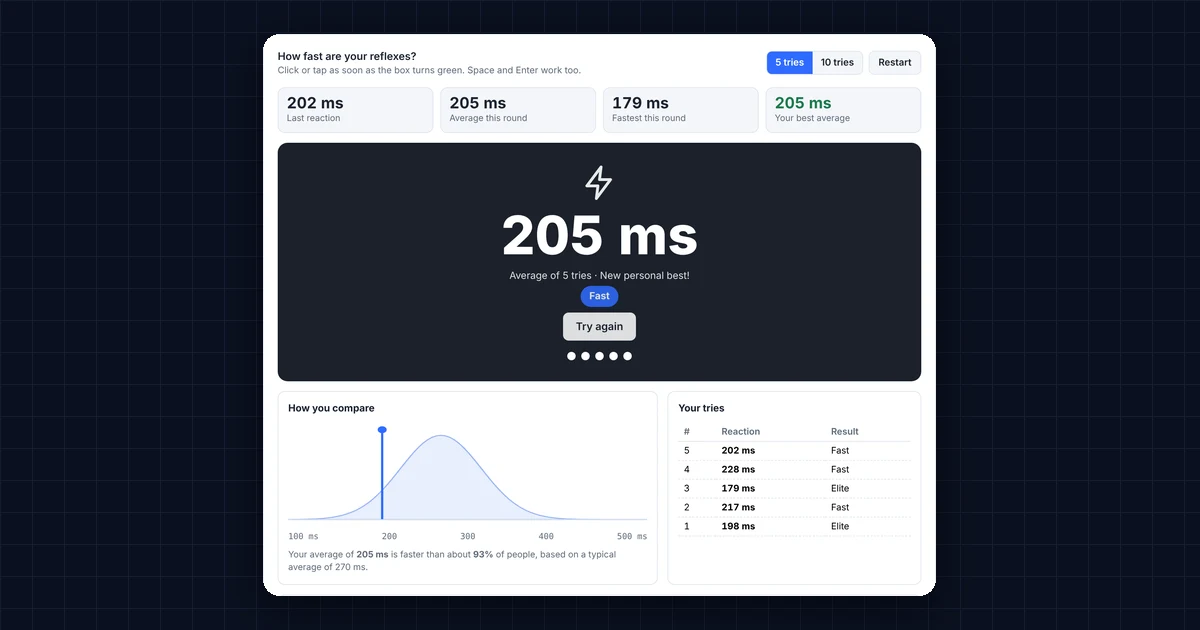
Here is what each result means:
- Last reaction: the time between the box turning green and your click, in milliseconds.
- Average this round: the mean of all your tries. In fact, this is the most reliable number, because single tries vary a lot.
- Fastest this round: your single best try.
- Your best average: your best round so far. However, the test saves it only in this browser.
- How you compare: the curve shows typical reaction times, and the blue line marks your average.
What Is a Good Reaction Time Test Score?
Most people react to a visual signal in about 200 to 300 milliseconds (see mental chronometry on Wikipedia). So here is how your average compares:
- Under 150 ms: superhuman, or more likely a lucky guess. Try another round to confirm it.
- 150 to 200 ms: elite. For example, many competitive gamers and athletes score here.
- 200 to 250 ms: fast, and clearly better than most people.
- 250 to 300 ms: average. In other words, this is where most people land.
- 300 to 350 ms: below average. Often, tiredness or a slow setup causes it.
- Over 350 ms: slow. Check your setup first, because lag in the mouse or screen adds time.
Why Your Setup Changes Your Reaction Time Test Score
Your score includes more than your reflexes. In addition, every device in the chain adds a little delay, known as input lag:
- Monitor: a 60 Hz screen can add up to 16 ms before you even see green, while a 144 Hz screen adds up to 7 ms. You can check yours with the Refresh Rate Test.
- Mouse: wireless mice with power saving, and mice with a low polling rate, add a few milliseconds.
- Browser and computer: a busy computer or a background tab can delay the timer, so keep the test tab in front.
The reaction time test measures time with your browser’s high-precision timer (see performance.now() on MDN), and it starts timing when the green frame is drawn. Even so, compare your scores on the same device for the fairest results.
How to Improve Your Reaction Time
- Get enough sleep. Tiredness is one of the biggest causes of slow reactions.
- Warm up. Similarly, a few practice rounds or a few minutes of gaming wake up your reflexes.
- Focus on the signal. Look at the center of the box and keep your finger resting on the button.
- Practice regularly. Short daily sessions, such as a few rounds of this reaction time test or the Click Speed Test, improve consistency.
- Upgrade your gear. Finally, a wired gaming mouse and a high refresh rate monitor remove avoidable lag.
Frequently Asked Questions
What is the average reaction time?
For a visual signal, the average human reaction time is around 250 to 270 milliseconds. However, young adults and gamers often score between 200 and 250 ms.
Is 200 ms a good score in the reaction time test?
Yes. In fact, 200 ms is fast, and it is better than most people score. Consistently staying under 200 ms puts you in the elite range.
Does the reaction time test work on a phone?
Yes. Simply tap the box when it turns green. Touch screens can add a little delay, though, so phone scores are often slightly slower than mouse scores.
Why is my reaction time slower than usual?
Tiredness, distractions, a slow monitor or a wireless mouse in power-saving mode can all add time. So try again after a break, on a wired mouse, with the test tab in front.
Can I improve my reaction time with practice?
Yes, to a point. Regular practice mainly makes your reactions more consistent, while sleep, focus and good gear remove the extra delay.
Need a website or CRM set up for you?
Besides free tools, DgTrick also builds WordPress websites and GoHighLevel automations for growing businesses, so tell us what you need.