Free Text to Speech
Turn any text into speech with this free text to speech tool. Listen instantly in English, Urdu or Hindi with nothing to download, or pick one of 27 studio AI voices and download your voiceover.
Type or paste your text, pick a voice, then press PlayNo sign-up. Studio AI voices are created entirely on your device.
Your audio
Files are saved as WAV, which works in YouTube, CapCut, Premiere, DaVinci Resolve, TikTok and most audio apps.
How to Use Free Text to Speech
- Add your text. First, type or paste your script into the box above. For long scripts, leave an empty line between paragraphs.
- Choose the voice type. Instant voices use the voices already on your device, so they start right away with nothing to download. Studio AI voices sound more natural and let you download the audio.
- Pick a voice. Then press Preview voice to hear how it sounds before you play or generate the whole script.
- Adjust the speed and pauses. Slow the voice down for tutorials, or speed it up for short videos. The pause slider adds breathing room between paragraphs.
- Play or download. Finally, press Play to listen with an instant voice, or press Record & download on Windows to save it. With Studio AI voices, press Generate voice and download the full voiceover or one audio file per paragraph.
Studio AI voices need a one-time download of the AI voice model (about 88 MB, or 330 MB for High quality), so use Wi-Fi the first time. After that, the model is saved in your browser, so the free text to speech tool starts instantly on your next visit.
Instant Voices vs Studio AI Voices
| Feature | Instant voices | Studio AI voices |
|---|---|---|
| Download needed | None | One-time 88 MB |
| Sound | Depends on your device | Natural and human-like |
| Download as audio | Yes, with Record & download on Windows | Yes, WAV files on any computer |
| Languages | English, Urdu, Hindi and more, depending on your device | American and British English |
| Best for | Listening to articles and proofreading | YouTube voiceovers, podcasts and ads |
Free Text to Speech in Urdu and Hindi
You can also listen to Urdu and Hindi text. Simply paste your text, and the tool switches to the right language automatically. You can also pick it yourself from the Language list.
- On a computer, Microsoft Edge usually includes free Urdu and Hindi voices, and Chrome includes a Hindi voice.
- On Android, go to Settings, then Text-to-speech output, and install Urdu or Hindi voice data in Speech Services by Google.
- On iPhone, Hindi voices are usually built in. You can add more voices in Settings, then Accessibility, then Spoken Content.
Urdu and Hindi work with Instant voices. To save an Urdu or Hindi voiceover as an audio file, use Record & download in Chrome or Edge on Windows, as explained below. Studio AI voices currently speak English only.
How to Download Urdu Text to Speech Audio
- Open the tool in Chrome or Edge on Windows, and close any other videos or music.
- Press Record & download. In the box that opens, choose Entire screen and turn on Also share system audio, and then click Share.
- Let it read your text. The tool records the voice while it plays, and stops by itself at the end.
- Download the WAV file. Silence at the start and end is trimmed automatically, so the file is ready for CapCut or YouTube.
Why Use This Free Text to Speech Tool?
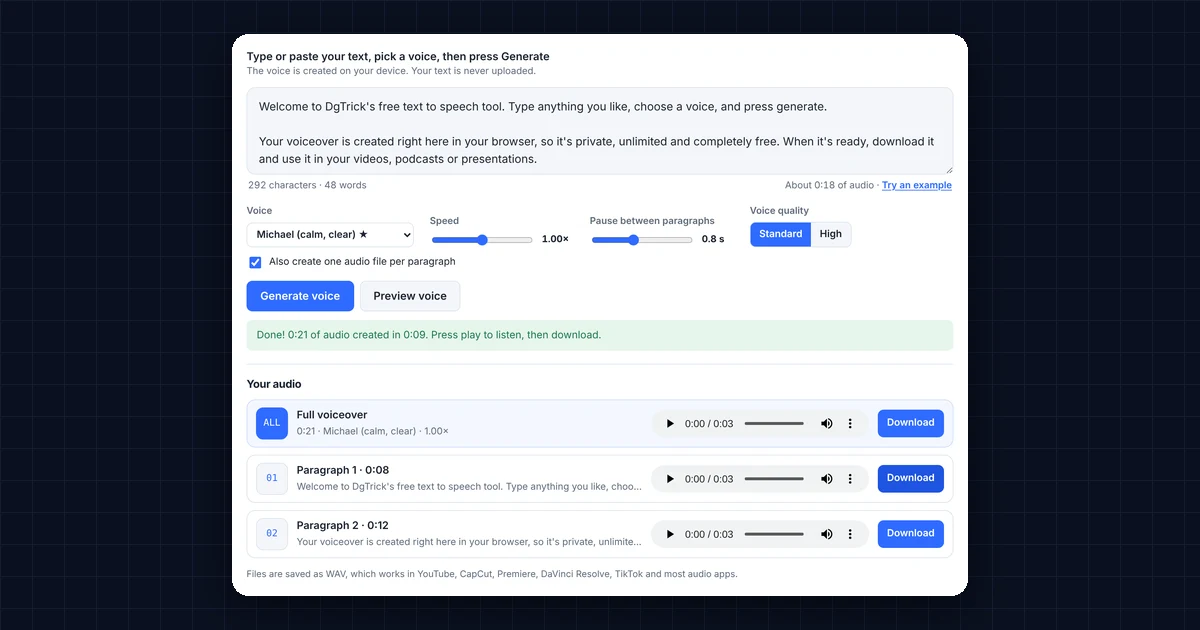
Most free AI voice generators give you a few minutes of audio, then ask you to sign up or pay. This text to speech online tool works differently, because the voice is created on your own device instead of on a server. As a result:
- It’s truly unlimited. There are no monthly credits, daily caps or character limits, so generate as much as you need.
- It sounds natural. The voices use Kokoro, a modern open-source AI voice model, so they sound far more human than the robotic voices built into your computer.
- It’s private. Studio AI voices run entirely in your browser, so scripts, notes and client work stay on your device.
- It saves editing time. Per-paragraph files make it easy to line up each part of your voiceover with the matching scene in your video editor.
Can I Use Free Text to Speech on YouTube?
Yes. The voices come from the Kokoro-82M model, which is released under the Apache 2.0 open-source licence. That means you can use the audio you create in monetized YouTube videos, TikTok and Instagram Reels, podcasts, ads, online courses and client projects, with no fee and no attribution required.
However, YouTube still expects real value in every video. So use this free AI voiceover for YouTube to narrate your own script and research, rather than to mass-produce copies of the same video.
Best Text to Speech Voices for Each Use
| Use | Recommended voices | Why |
|---|---|---|
| YouTube reviews & tutorials | Michael, Heart | Calm, clear and easy to follow for long videos |
| Shorts, TikTok & Reels | Puck, Bella | Energetic and expressive, so they grab attention |
| Ads & promos | Fenrir, Nova | Confident, punchy delivery |
| Audiobooks & stories | George, Emma, Nicole | Warm and relaxed for long listening |
| British accent text to speech | George, Emma, Fable, Isabella | Natural UK English pronunciation |
Tips for Natural Text to Speech Voiceovers
- Write the way people talk. Short sentences and everyday words sound far more natural than formal writing.
- Use punctuation to control pacing. A comma adds a short pause, a full stop adds a longer one, and a question mark changes the tone.
- Spell out tricky items. For example, write “fifty thousand rupees” instead of “Rs 50k” and “AI” as “A.I.” if it’s read wrongly.
- Split long scripts into paragraphs. Then use the per-paragraph files to edit or replace one part without regenerating everything.
- Keep one voice per project. Using the same voice and speed in every video makes your channel sound consistent.
DgTrick vs Other Free Text to Speech Tools
| Feature | DgTrick Text to Speech | ElevenLabs Free plan |
|---|---|---|
| Price | Free | Free |
| Audio limit | Unlimited | About 10 minutes a month |
| Sign-up | Not needed | Required |
| Commercial use | Allowed | Not allowed on the free plan |
| Where it runs | On your device | On their servers |
| Languages | American & British English | Many languages |
In short, paid tools offer more languages and voice cloning, while this free text to speech tool is the easiest way to get unlimited, commercially usable English voiceovers without spending anything.
Frequently Asked Questions
Is this text to speech tool really free?
Yes. It’s completely free, with no sign-up, no watermark and no limit on how much audio you create.
Can I use the audio in monetized YouTube videos?
Yes. The voices come from the Kokoro-82M model under the Apache 2.0 licence, so you can use the audio in monetized videos, ads, podcasts and client work without attribution.
Do I have to download anything?
No. Instant voices start right away with nothing to download. Only Studio AI voices need a one-time 88 MB download, which your browser then saves for next time.
Can I download the instant voices?
Yes, on Windows. Press Record & download in Chrome or Edge and share your system audio, and the tool saves the voice as a WAV file. On Mac, iPhone and Android, browsers can’t record these voices, so use Studio AI voices or your phone’s screen recorder instead.
Is my text uploaded anywhere?
Not to DgTrick. Studio AI voices are created inside your browser, so your text never leaves your device. With instant voices, voices marked “Online” or “Google” are provided by your browser maker and may be processed on their servers, so pick another voice for private text.
Which languages are supported?
Instant voices support English, Urdu, Hindi and many more languages, depending on the voices your device has. Studio AI voices support American and British English, with 27 male and female voices.
What audio format do I get?
You get high-quality WAV files, which work in YouTube, CapCut, Premiere Pro, DaVinci Resolve and most audio apps. You can convert them to MP3 afterwards if you need smaller files.
Does it work on my phone?
Yes. Instant voices work well on phones. Studio AI voices also work in a modern browser, but they’re much faster on a laptop or desktop, especially in Chrome or Edge.
Need a website or CRM set up for you?
Besides free tools, DgTrick also builds WordPress websites and GoHighLevel automations for growing businesses, so tell us what you need.