Mouse Click Test
Run a free mouse click test to check every button on your mouse, including the scroll wheel and side buttons. The test also catches a mouse that double clicks by itself.
Click inside the dark area with every mouse buttonAlso scroll the wheel up and down. Orange means a button registered an accidental double click.
Click history
| Button | Held | Gap since last | |
|---|---|---|---|
| Your clicks will be listed here, newest first. | |||
Settings and wheel
- Scrolls up
- 0
- Scrolls down
- 0
- Tilts left / right
- 0 / 0
- Intended double clicks
- 0
Everything runs in your browser. Side buttons (Back and Forward) will not navigate away while you click inside the test area.
How to Use This Mouse Click Test
- Move your pointer into the dark test area. First, the mouse click test only counts clicks inside this area.
- Click each button a few times. Next, press left, right and middle (push the scroll wheel down). If your mouse has side buttons, press Back and Forward too.
- Scroll the wheel. Then scroll up and down. If your mouse has a tilting wheel, push it left and right as well.
- Watch the colors. Each working button turns green on the mouse diagram. However, a button that turns orange registered an accidental double click.
- Run a longer test. Finally, click the left button slowly 30 to 50 times, because faulty switches often fail only now and then.
Inside the test area, the mouse click test also blocks right-click menus and Back/Forward navigation. As a result, you can click freely without leaving the page.
Reading Your Mouse Click Test Results
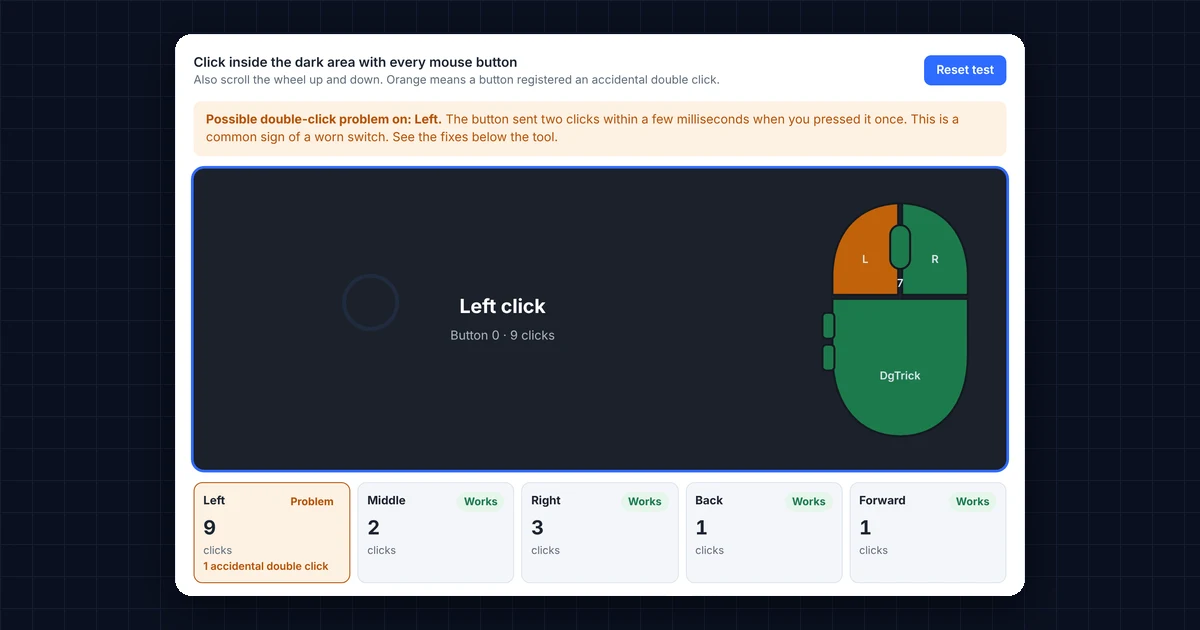
Here is what each result in the mouse click test means:
- Works (green): the button sends clicks correctly.
- Problem (orange): the button sent a second click within a few milliseconds of release. In other words, you pressed once, but your computer saw two clicks.
- Not tested: you have not pressed the button yet, or the click did not reach the browser.
- Held: how long you pressed the button, in milliseconds. Typically, a normal click lasts 50 to 150 ms.
- Gap since last: the time between two presses of the same button. The test flags gaps under the threshold (80 ms by default), because a person cannot normally click that fast with one finger.
- Intended double clicks: double clicks your operating system recognized, for example when you double-click on purpose to open a file.
Mouse Click Test Shows Double Clicks? Here’s Why
When a mouse clicks twice on its own, the small switch under the button almost always causes it. Inside the switch, a metal contact bounces or wears out over time, so a single press briefly connects twice. Engineers call this switch bounce or chatter (see contact bounce on Wikipedia). It usually starts on the left button, because you use it the most.
Typical symptoms include files opening when you meant to select them, drag-and-drop letting go halfway, and text selections jumping. Similarly, in games, single shots may fire twice.
How to fix a mouse that fails the click test
- Rule out settings first. On Windows, open Control Panel → Mouse → Buttons, check that ClickLock is off, and move the double-click speed slider to the middle. On a Mac, check System Settings → Accessibility → Pointer Control.
- Raise the debounce time. Many gaming mice have a “debounce” or “click delay” setting in their software, such as Logitech G Hub, Razer Synapse or SteelSeries GG. So raising it slightly filters out the extra clicks.
- Update the mouse firmware. In addition, some brands have fixed double-click issues with firmware updates in their software.
- Check the warranty. Double clicking is a known fault, so many brands replace mice with this problem under warranty.
- Replace the switch. Finally, if you are comfortable with a soldering iron, a new switch costs very little. Alternatively, optical-switch mice do not suffer from this problem at all.
Other Problems the Mouse Click Test Can Find
A button fails the mouse click test completely
First, try the mouse on another USB port or another computer. If the button still fails, the switch or its connection is broken. For wireless mice, however, replace the battery first, because a weak battery can cause missed clicks.
Side buttons do nothing in the mouse click test
Some mice need their own software for the side buttons to work. Alternatively, the software may have reassigned the buttons to other actions. In that case, open the mouse’s software and set them back to Back and Forward.
The scroll wheel jumps or scrolls the wrong way
If the wheel counts both up and down when you scroll in one direction, the wheel encoder is dirty or worn. Often, blowing compressed air around the wheel helps. On the other hand, fast and uneven scrolling can also come from “smooth scrolling” or “free-spin” settings in the mouse software.
How the Mouse Click Test Reads Your Buttons
Your browser reports every mouse button with a number: 0 for left, 1 for middle, 2 for right, 3 for Back and 4 for Forward (see the MouseEvent.button reference on MDN). The mouse click test records when each button goes down and up, so it can measure how long you held it and how close two clicks were. Because of this, it works with any computer mouse, touchpad or trackball.
Frequently Asked Questions
How do I know if my mouse is double clicking?
Click the left button slowly 30 to 50 times in the test area. If the button turns orange and the history shows “Accidental double click”, your mouse sent two clicks for a single press.
What threshold should I use in the mouse click test?
80 ms is a good default, because real switch chatter usually happens within 10 to 50 ms. However, if you click very fast on purpose, lower it to 50 ms to avoid false warnings.
Can I run the mouse click test on a touchpad?
Yes. Taps and clicks on a touchpad count as left clicks. Likewise, two-finger taps count as right clicks, and two-finger scrolling counts as the wheel.
Does it work with wireless and Bluetooth mice?
Yes. In short, any mouse that works with your computer works with this test.
Why don’t my Back and Forward buttons register?
Your mouse software may have reassigned them, or your mouse may need its software for the side buttons to work. Also, some browsers on macOS do not report side buttons to websites.
Need a website or CRM set up for you?
Besides free tools, DgTrick also builds WordPress websites and GoHighLevel automations for growing businesses, so tell us what you need.