Free Speech to Text
Use this free speech to text tool to type with your voice, or turn voice notes, recordings and videos into text. It works in English, Urdu, Hindi and more, with no sign-up.
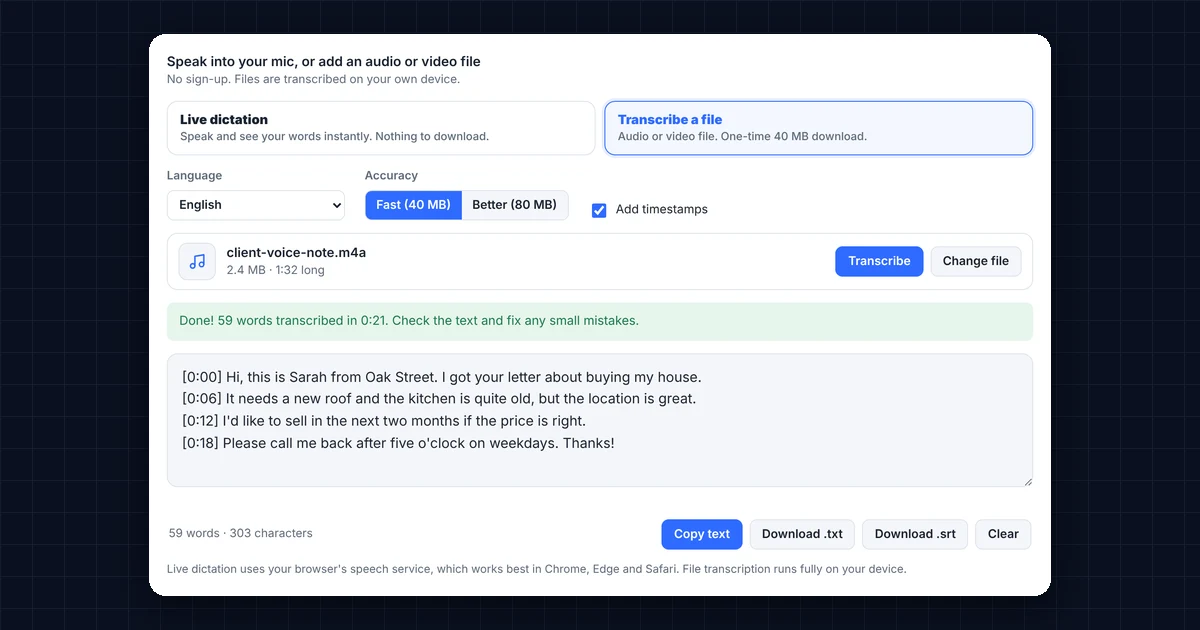
Speak into your mic, or add an audio or video fileNo sign-up. Files are transcribed on your own device.
Live dictation uses your browser’s speech service, which works best in Chrome, Edge and Safari. File transcription runs fully on your device.
How to Use Free Speech to Text
- Choose how to transcribe. Pick Live dictation to type with your voice, or Transcribe a file to turn a recording into text.
- Select the language. English is selected by default, and you can also choose Urdu, Hindi, Arabic and more. For files, Detect automatically works too.
- Speak or add your file. For dictation, press Start speaking and allow the microphone. For a file, drop your audio or video and press Transcribe.
- Copy or download. Finally, fix any small mistakes in the text box, and then copy the text or download it as a .txt file. With timestamps on, you can also download .srt subtitles.
Live Dictation vs File Transcription
| Feature | Live dictation | Transcribe a file |
|---|---|---|
| Download needed | None | One-time 40 MB (or 80 MB for Better) |
| Works with | Your microphone, in real time | MP3, WAV, M4A, OGG, OPUS, WebM and MP4 files |
| Where the speech is processed | Your browser’s speech service | On your own device |
| Timestamps and subtitles | No | Yes, with .srt download |
| Best browsers | Chrome, Edge and Safari | Chrome and Edge on a computer |
In short, live dictation is the quickest way to write emails, notes and messages by voice. File transcription, on the other hand, is better for WhatsApp voice notes, interviews, lectures and YouTube videos.
What Can You Do With Speech to Text?
- Type faster. Most people speak about three times faster than they type, so dictating long emails or articles saves a lot of time.
- Turn voice notes into text. For example, save a WhatsApp voice note as a file and transcribe it to read it later or forward it as text.
- Make subtitles. Transcribe your video with timestamps, download the .srt file, and upload it to YouTube or CapCut.
- Write notes from meetings and lectures without typing while you listen.
- Write in Urdu or Hindi without a special keyboard, simply by speaking.
Is This Speech to Text Tool Private?
For files, yes. File transcription uses Whisper, an open-source speech recognition model by OpenAI (see Whisper on GitHub). It runs inside your browser, so your recordings never leave your device.
Live dictation works differently, because it uses the speech service built into your browser. As a result, your voice is sent to Google in Chrome, Microsoft in Edge or Apple in Safari to be turned into text. DgTrick never receives or stores your audio or text in either case.
Tips for Accurate Speech to Text
- Use a headset or a quiet room. Background noise is the most common cause of mistakes.
- Speak clearly at a normal pace. You don’t need to speak slowly, but avoid mumbling.
- Add punctuation afterwards. Dictation mostly writes words without commas and full stops, so read the text once and add them before you send it.
- Choose the right language. Selecting Urdu or Hindi instead of automatic detection gives better results for those languages.
- Try Better accuracy for difficult audio. It takes longer, but it handles accents and noise better.
Frequently Asked Questions
Is this speech to text tool free?
Yes. It’s completely free, with no sign-up, no watermark and no limit on how much you transcribe.
Does it support Urdu and Hindi?
Yes. Both live dictation and file transcription support Urdu and Hindi, as well as English, Arabic, Bengali and more. Live dictation in Urdu works best in Chrome.
Why does file transcription download something?
The speech model runs on your device, so your browser downloads it once (about 40 MB). After that, it is saved, so later visits start much faster.
How long can my file be?
Files up to 300 MB work. Long recordings take longer on slower computers, so keep the tab open until it finishes.
Can I make YouTube subtitles with it?
Yes. Turn on Add timestamps, transcribe your video, and then download the .srt file and upload it in YouTube Studio.
Why doesn’t live dictation work in Firefox?
Firefox doesn’t include a speech recognition service yet. Instead, use Chrome, Edge or Safari, or use file transcription, which works in any modern browser.
Need a website or CRM set up for you?
Besides free tools, DgTrick also builds WordPress websites and GoHighLevel automations for growing businesses, so tell us what you need.