Speed to lead in real estate is how fast you contact a new lead after they reach out. A motivated seller who fills in your form at 9 PM is usually talking to several buyers at once, so the first one to reply often gets the conversation, the appointment and, in the end, the contract. In this guide, you’ll learn what speed to lead means, why it matters so much for investors and wholesalers, and how to set it up in GoHighLevel so every lead gets a reply in under a minute.

Key takeaways
- Speed to lead is the time between a new lead coming in and your first contact.
- Replying within an hour makes a lead about 7 times more likely to qualify than waiting longer.
- GoHighLevel can send the first text in under a minute, day and night.
- Your texts only arrive if your number is A2P 10DLC registered.
What Is Speed to Lead in Real Estate?
Speed to lead is the time between a lead coming in and your first real contact with them. For a real estate investor, that lead might be a seller who filled in a “sell my house fast” form, called your number from a Facebook ad, replied to a text campaign or left a voicemail.
Great
Under 1 min
Only realistic with automation
Good
Under 5 min
A fast call from your rep
Too slow
Hours
Where most teams are today
Most teams take hours to reply. Some only reply the next morning, and some never reply at all.
Why Speed to Lead Matters So Much in Real Estate
The research is clear. A Harvard Business Review study of 2,241 US companies found that firms that contacted a web lead within an hour were far more likely to qualify it than firms that waited longer:
7x
more likely to qualify than waiting one hour longer
60x
more likely than waiting 24 hours or more
42 hrs
average response time across companies
23%
of companies never responded at all
In real estate, the effect is even stronger, for three reasons:
- Sellers shop around. A motivated seller often fills in two or three cash-offer forms on the same night. The first buyer who calls gets to build trust first.
- Motivation fades. A seller who is ready to talk tonight may change their mind by tomorrow, or a relative may talk them out of selling.
- Leads are expensive. A PPC or Facebook seller lead can cost a lot of money. Letting it sit for 12 hours wastes that spend.
Signs Your Speed to Lead Is Too Slow
Many teams think they reply quickly until they check. Look for these warning signs in your CRM:
- New leads sit in the “New” stage for hours before anyone touches them.
- Leads that come in after 6 PM or on weekends wait until the next working day.
- Missed calls get a voicemail but no text back.
- Your acquisitions rep finds out about a lead by checking the CRM, not from an instant alert.
- You pay for leads, but your contact rate is low.
If two or more of these sound familiar, your speed to lead is costing you deals.
How to Set Up Speed to Lead in GoHighLevel
GoHighLevel can reply to every lead automatically, day and night. Here is the setup we use for real estate investors and wholesalers. You can build it in a few hours, or have DgTrick build it for you.
Step 1
Connect every lead source
First, make sure every lead lands in GoHighLevel. Connect your website forms, Facebook lead ads, landing pages and phone numbers. If a lead source isn’t connected, your automation can’t reply to it.
Step 2
Create a speed to lead workflow
Next, go to Automation → Workflows and create a new workflow. Add a trigger for each lead source, such as Form Submitted, Facebook Lead Form Submitted or Inbound Webhook. Then add these actions:
- Create or update the opportunity in your seller pipeline, in the “New Lead” stage.
- Send an SMS right away, with no wait step.
- Send an email with the same message, in case the number is wrong.
- Send an internal notification to your acquisitions rep through the GoHighLevel app.
Step 3
Write a first text that sounds human
Your first message should sound like a person, not a robot. Keep it short and end with a simple question. For example:
Hi John, this is Mike with Lone Star Home Buyers. Thanks for reaching out about your house on Oak Street! Is now a good time for a quick call, or would later today be better?
Sent automatically, 42 seconds after the form
Tip: avoid links and long paragraphs in the first text. They look like spam, and carriers are more likely to filter them.
Step 4
Add missed-call text back
Many sellers call instead of filling in a form. So add a second workflow with the trigger Call Status: Missed or No Answer, and send an instant text such as “Sorry we missed your call! Are you calling about selling a property?”. This one workflow alone can save several leads a week.
Step 5
Stop the follow-up when the seller replies
Then add a goal step or an “if/else” branch: when the contact replies, remove them from the follow-up sequence and notify your rep. Nothing annoys a seller more than getting automated texts after they’ve already answered.
Step 6
Register for A2P 10DLC
Finally, your texts must actually be delivered. In the US, carriers filter messages from business numbers that aren’t registered for A2P 10DLC. If your brand and campaign aren’t approved, your perfect speed to lead workflow may send texts that nobody receives. We’ll cover A2P registration step by step in a future post.
A Simple Speed to Lead Timeline
Here is what a strong real estate speed to lead setup looks like from the seller’s side:
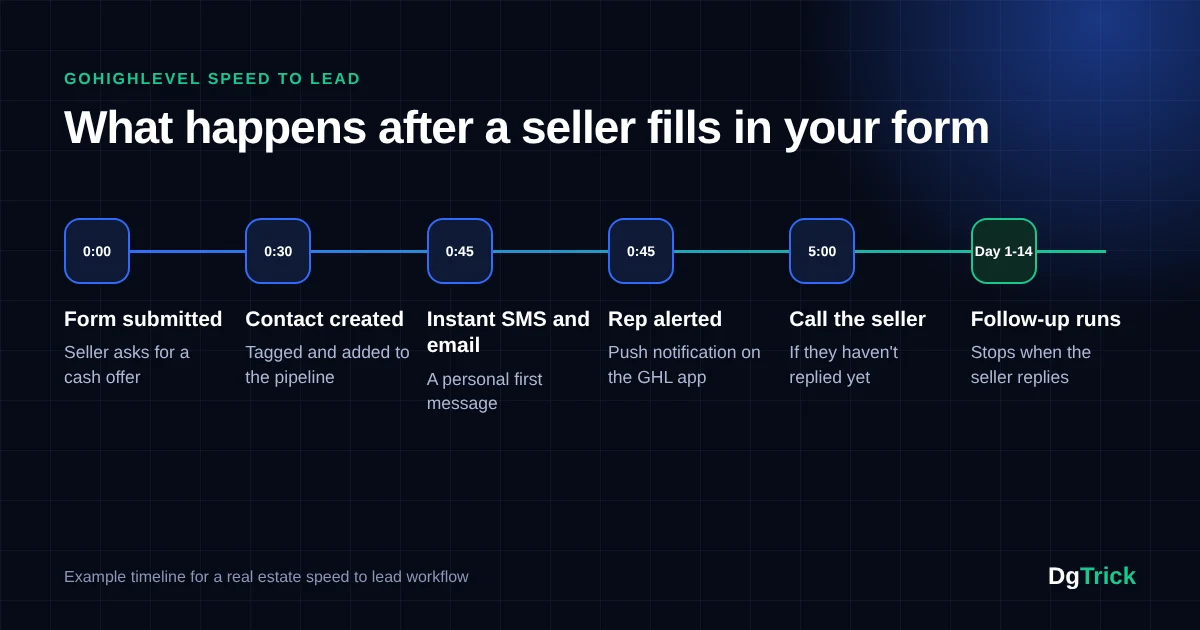
| Time | What happens |
|---|---|
| 0:00 | The seller submits your “sell my house fast” form. |
| 0:30 | GoHighLevel creates the contact, tags the source and adds the deal to your pipeline. |
| 0:45 | The seller gets a personal text and an email. |
| 0:45 | Your acquisitions rep gets an alert on their phone. |
| 5:00 | If the seller hasn’t replied, your rep calls them. |
| Day 1 to 14 | A follow-up sequence runs until the seller replies or books. |
Common Speed to Lead Mistakes
Adding a wait step before the first text
Even a 10-minute delay gives competitors time to call first.
Only replying during office hours
Many sellers search at night and on weekends, exactly when automation helps most.
Duplicate triggers
If two workflows fire on the same form, the seller gets two texts, which looks careless.
No human follow-up
Automation starts the conversation, but a real person still needs to call and build trust.
Never testing
Submit your own form every few weeks to check that everything still works.
Speed to Lead in Real Estate: Frequently Asked Questions
What is a good speed to lead time for real estate?
Aim for under five minutes for a call and under one minute for the first text. An automated text in GoHighLevel can go out within seconds of the lead coming in.
Can I automate speed to lead without GoHighLevel?
Yes. Other CRMs and tools like Zapier can send instant replies. However, GoHighLevel puts the forms, pipeline, texting, calling and workflows in one place, which makes it easier to build and maintain.
Does speed to lead work for cold leads too?
It matters most for inbound leads, people who contacted you first. For cold lists, the focus shifts to consistent follow-up over weeks and months.
How do I measure my speed to lead?
Compare the time each lead was created with the time of your first outbound message or call. In GoHighLevel, you can check this in the contact’s activity history.
Get Your Speed to Lead Set Up
Want this built for you?
A fast speed to lead system is one of the simplest ways for a real estate investor to win more deals from the same lead spend. DgTrick sets up complete GoHighLevel systems for real estate teams, including speed to lead, missed-call text back, follow-up and A2P registration.